Table of Contents
Open Table of Contents
The problem with thick harnesses
Claude Code is impressive. It ships with plan mode, sub-agents, a polished TUI, background bash, and the Agent View dashboard for dispatching multiple sessions. It packed with a lot of prompts by default and there are many invisible tricks that harness do for you.
The problem: the harness decides your workflow by that.
Plan mode kicks in when it wants to. Sub-agents follow Anthropic’s dispatch pattern. The tools are what they are - you can’t add one, you can’t change how they interact. When Anthropic ships a new feature, you adapt. When they change the pricing model, you adapt.
And of course its only one direction you need to install more skill to mitigate something. I’m still using Claude without any workflow skills. Still annoyed by never ending permission prompts.
“Claude Code, Codex, OpenCode are great places to start, bute they limit what you believe is possible.”
The harness shapes your mental model of what agents can do. A thick harness shrinks that model. A thin one expands it.
What makes pi different
Pi ships with exactly four tools: read, write, edit, bash. That’s it. No plan mode. No sub-agents. No to-dos. No MCP. No permission popups!. The agent can read files, write files, edit them, and run commands.
Everything else you build yourself. Or more precisely: you tell the agent to build it.
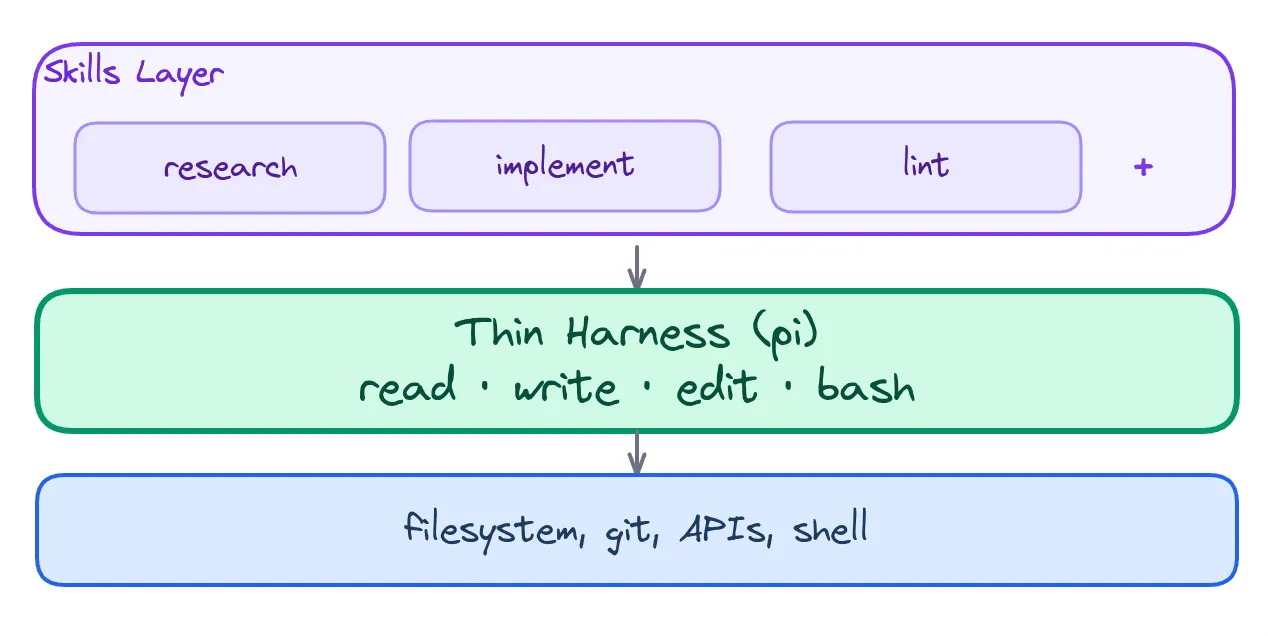
Pi extensions are TypeScript files loaded at runtime - no build step, no npm publish, no compile. You can write one in 30 lines and have a new slash command or a custom tool available on the next turn. The agent can even write its own extensions: it creates the .ts file, runs pi install, calls /reload, and the tool exists.
It works today. Mario Zechner (the author of libGDX, and now pi) deliberately kept the core minimal so the extension surface becomes the product.
I’ll give you a concrete example. You want a /yeet command - git add . && git commit -m "msg" && git push, with an optional PR. Instead of waiting for a feature request, tell pi: “build a /yeet slash command extension.” It will write it. Pi has documentation about own SDK build in.
Of course you can build you promts, skills (other harnesses have it too) but you can also build any kind of extensions that can use 25+ lifecycle hooks and other SDK features. Pretty awesome.
The same goes for model selection. Pi supports 25+ providers - Anthropic, OpenAI, Google Gemini, DeepSeek, Groq, Mistral, AWS Bedrock, OpenRouter, and more. I route exploration tasks through Haiku ($0.25/M tokens) or DeepSeek ($0.14/M) and reserve Opus for the actual code generation. Claude Code locks you into one Anthropic subscription at one price.
The session control
Most coding agents give you a linear transcript. You go forward or you restart.
Pi’s sessions are a tree. Every entry has a parentId - messages, tool calls, compactions, model changes form a directed graph. You can fork at any point (/fork), jump to any branch (/tree), try approach A, fork, try approach B, compare, keep both.
For complex debugging or exploration, this is invaluable. You don’t lose context. You don’t have to redo work to explore an alternative path.
and of course you can use your own compaction algorithm ;)
Where pi is weaker
I’m not going to pretend pi is perfect. Here’s what you lose:
| pi lacks | Claude Code has |
|---|---|
| Built-in Agent View TUI for session management | Polished dashboard with peek/reply |
| Git worktree isolation out of the box | Automatic sandboxing |
| Row summaries via cheap models (Haiku status checks) | Built-in dashboard intelligence |
| Large community, extensive docs | Massive user base, lots of tutorials |
And honestly: pi expects you to know your workflow. It doesn’t come with issue tracking, task management, or opinionated project structures - you bring your own. In my case that means tl for lightweight task capture. If you want an opinionated tool that tells you how to work, pi will frustrate you. It’s a blank canvas. That’s the point - but it’s also a commitment.
Who should use pi
If you’re an experienced engineer who:
- Already knows how you want to structure your development workflow
- Wants to shape your tools rather than be shaped by them
- Values model freedom (routing cheap models to exploration, expensive ones to generation)
- Runs multiple agent sessions and wants them to coordinate
- Prefers your skills (Markdown programs) to be harness-agnostic and portable
…then pi is worth a serious look.
If you’re just getting started with coding agents and want the smoothest possible experience out of the box - start with Claude Code. Learn what you want. Then come back to pi.
Bottom line
The “thin harness, fat skills” paradigm - coined by Gary Tan at Y Combinator - argues that 90% of agentic value lives in the skills layer: the Markdown programs that teach the model how to do things. The harness should be invisible. Just I/O and process management.
Pi is the closest thing we have to that vision today.
npm install -g @earendil-works/pi-coding-agent
pi
Start with nothing. Build exactly what you need. That’s the pitch.
What’s your experience with coding agents? Drop a comment on X - I’m especially curious if you’ve tried pi and what you built with it.